About the Graduate + Projects layout
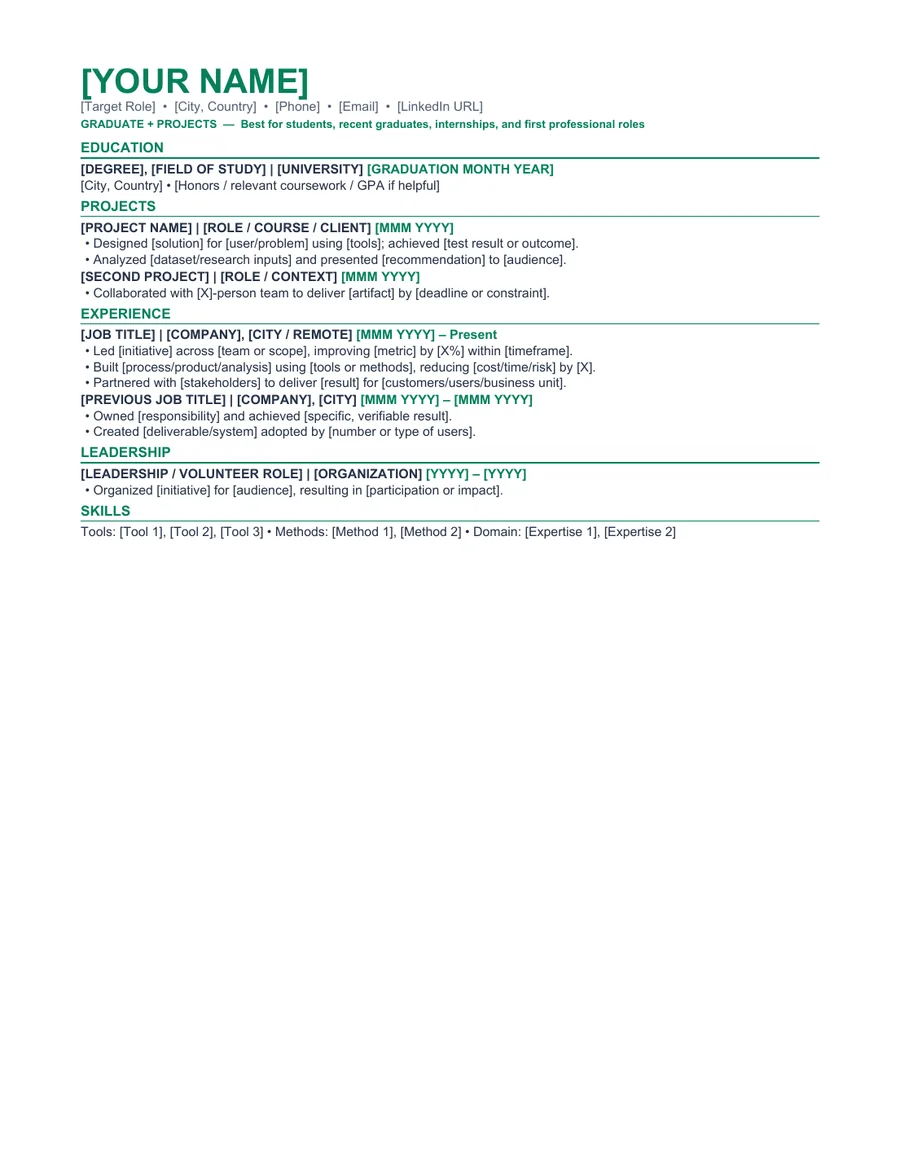
Graduate + Projects is designed for students and recent graduates who have useful evidence but limited full-time experience. It gives education, projects, activities, internships, and practical skills a natural position without pretending that coursework is employment.
Traditional experience-first resumes can hide a student's strongest evidence. This layout moves education and selected projects upward while still leaving room for part-time work, volunteering, leadership, and transferable responsibilities.
Who this template is for
Best for
College students applying for internships or first professional roles
Best for
Recent graduates with strong projects, activities, volunteering, or part-time work
Best for
Candidates whose education and project evidence is more relevant than their employment history
When to choose another layout
Do not fill space with every class, club, or software package. Select evidence that demonstrates skills requested in the target internship or entry-level job.
Recommended resume sections
- Education - include degree, graduation date, and selected relevant details.
- Projects - explain objective, contribution, tools, and result.
- Experience - include internships, part-time work, volunteering, and meaningful informal work.
- Activities and Leadership - use evidence, not membership lists.
- Skills - include tools, languages, and certifications you can demonstrate.
Copyable summary framework
[Degree or major] student graduating [month/year] and seeking a [internship or role]. Applied [relevant skills] through [project, course, activity, or work context] and contributed to [specific result, deliverable, or responsibility].
Resume bullet examples
Replace every bracketed prompt with facts you can explain in an interview. Remove any example that does not match your work.
- Created [project or deliverable] using [relevant method or tool] to address [problem or assignment].
- Coordinated [activity, event, team, or responsibility] for [audience], completing [specific outcome].
- Balanced [work, volunteering, or leadership responsibility] for [hours/frequency] while completing [academic commitment].
How to edit the Word template
- Download and extract the ZIP file.
- Open the DOCX file in Microsoft Word or a compatible editor.
- Replace every placeholder and sample line with your own information.
- Remove unused sections and keep spacing consistent.
- Export a PDF, reopen it, and check every page before applying.
Role-specific editing tips
- Replace an objective with a targeted summary that names the role.
- Use project bullets to show decisions and deliverables.
- Include GPA only when useful and accurate.
- Keep the resume to one page unless the target field expects otherwise.
ATS and formatting note
This template uses common section labels, selectable text, and system fonts. Those choices can reduce avoidable formatting problems, but ATS products and employer configurations differ. Always follow the job posting and test the final DOCX or PDF yourself. Read our No Experience Resume Template for High School Students for a practical formatting checklist.
Frequently asked questions
Is this college student resume template really free?
Yes. The Word and PDF files are available without payment, account creation, or email submission. The personal-use license is explained in the Terms of Service.
Can I edit the template in Microsoft Word?
Yes. The ZIP includes an editable DOCX file and a reference PDF. After editing, export a fresh PDF and inspect page breaks, spacing, links, and contact details.
Does this template guarantee that an ATS will accept my resume?
No. Applicant tracking systems and employer configurations differ. The template uses readable headings and common document formats, but no template can guarantee parsing, ranking, an interview, or a job outcome.